Four Metrics. One Round Screen.
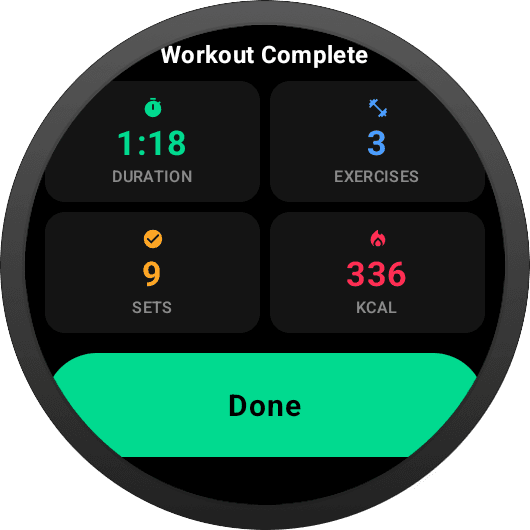
Each tile on the summary maps to one stat the watch has computed locally during your session. These are the exact values from the screenshot above.
Time from session start to Finish-tap. MM:SS under an hour, H:MM:SS past it — monospaced digits so the tile never reflows as seconds tick.
Anything you started counts — a partially-completed exercise still makes the total, matching how the phone app tallies your session.
Only sets where you actually recorded reps — never template targets, never planned-but-skipped sets. The number you see is the work you did.
Streamed from the Health Services ExerciseClient — the same source Google Fit and Samsung Health read. Collected continuously, so your daily activity ring already agrees.
Tap Finish → See the numbers.
The summary replaces the active-session view in place — no back navigation, no loading spinner. Done clears session data and drops you back on the Start Workout screen.
A confirmation shows remaining sets so you never end a workout by accident.
Same route, no transition delay. Every metric is already on the watch.
Session clears locally. Sync to the backend continues in the background.
All Data, On Device.
Every number on the summary is computed from the session snapshot the watch already holds in memory. Nothing waits on the phone or the server.
Calculated locally from session start timestamp to finish time. Zero network dependency.
Counted from SessionViewModel: any exercise where at least one set has reps recorded.
Total count of sets with reps logged. Only sets the user actually completed — not template targets.
Read from the Health Services ExerciseClient active-calorie stream. Falls back gracefully if unavailable.
Summary replaces the session view on finish — no back navigation, no loading state. Done clears session data.
Session pushes to the backend directly from the watch, or via the phone when nearby. The recap doesn't wait for sync to complete.
Finish Strong. See the Recap.
Download GainLogger for free and get your workout summary on your wrist the moment you finish.