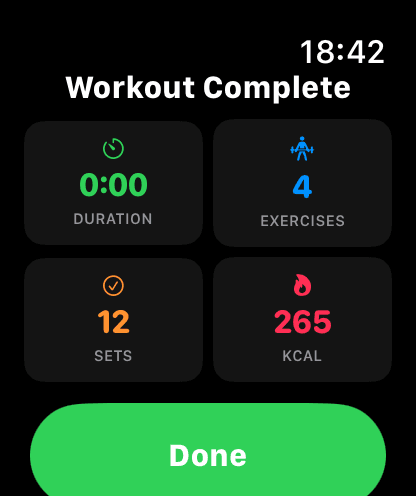
From Finish to Recap in One Tap.
Confirm, review, done. The summary replaces the session view immediately — no back navigation, no loading spinners.
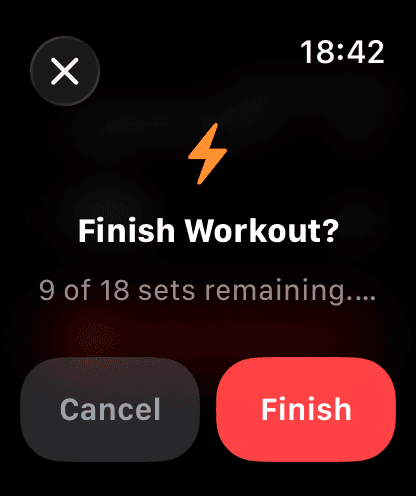
Real Time Under Tension.
Duration is measured from the moment you start the session on your Watch to the moment you confirm finish. Formatted as MM:SS for under an hour, H:MM:SS for longer sessions, with monospaced digits so the layout never jumps.
Credit for Every Set You Logged.
Exercises count reflects anything you started — partial exercises still count, matching the phone app. Sets count only includes sets with reps actually logged. No ghost data, no inflated numbers.
Calories Straight From HealthKit.
Active energy burned comes from Apple's HKWorkoutBuilder — the same source the Workout and Fitness apps use. Collected continuously during your session, so the number on the summary matches what's already on your Activity ring.
All Data, On Device.
Every metric shown on the summary is already on the Watch at finish time. No waiting for the phone to respond, no loading state.
Calculated locally from session start timestamp to finish time. Zero network dependency.
Counted from SessionViewModel: any exercise where at least one set has reps recorded.
Total count of sets with reps_actual. Only sets the user actually logged — not template targets.
Read from HealthKit activeEnergyBurned via HKWorkoutBuilder. Falls back gracefully if unavailable.
Summary replaces the session view on finish — no back navigation. Done clears session data.
Session pushes to your phone in the background. The recap doesn't wait for sync to complete.
Finish Strong. See the Recap.
Download GainLogger for free and get your workout summary on your wrist the moment you finish.